React hooks
Every built-in hook in React 19.2, grouped by job, plus the rules, effect pitfalls, custom hook conventions and a set of typed custom hooks to paste. Component-level concepts are in React; prop and event typing is in TypeScript & React.
All hooks at a glance
| Hook | Import | Returns | Reach for it to |
|---|---|---|---|
useState(init) | react | [value, setValue] | remember a value between renders |
useReducer(reducer, init) | react | [state, dispatch] | centralize many related updates |
useContext(Ctx) | react | context value | read context (top level only) |
use(ctxOrPromise) | react | value | read context or a promise; allowed in if and loops |
useRef(init) | react | { current } | hold a DOM node or a value that doesn't render |
useImperativeHandle(ref, make) | react | void | expose a custom handle through ref |
useEffect(fn, deps?) | react | void | sync with an external system after paint |
useLayoutEffect(fn, deps?) | react | void | measure or mutate layout before paint |
useInsertionEffect(fn, deps?) | react | void | inject <style> tags (CSS-in-JS libraries) |
useEffectEvent(fn) | react | effect event function | read latest props/state inside an effect without re-running it |
useMemo(fn, deps) | react | cached value | skip an expensive recomputation |
useCallback(fn, deps) | react | cached function | keep a function's identity for memo children or deps |
useTransition() | react | [isPending, start] | mark updates or async actions non-urgent |
useDeferredValue(v, init?) | react | lagging v | defer heavy UI driven by fast input |
useId() | react | string | unique ids for htmlFor, aria-* (SSR-safe) |
useSyncExternalStore(sub, get, getServer?) | react | snapshot | subscribe to a non-React store or browser API |
useDebugValue(v, fmt?) | react | void | label a custom hook in DevTools |
useActionState(fn, init, permalink?) | react | [state, dispatch, isPending] | state that updates through an action |
useOptimistic(value, reducer?) | react | [optimistic, set] | show the expected result while an action runs |
useFormStatus() | react-dom | { pending, data, method, action } | pending state of the parent <form> |
Rules of hooks
| Rule | Detail |
|---|---|
| Call at the top level | not inside if, loops, nested functions, try/catch, or after an early return |
| Call from React functions only | components and custom hooks, never plain functions or classes |
| Same order every render | React matches hook calls to state slots by call order |
use is the exception | it may sit in if and loops, but still not in try/catch |
| Don't pick hooks dynamically | const h = cond ? useA : useB breaks the order too |
| Components are pure | hooks' arguments and return values are treated as immutable |
import { useEffect, useState } from "react";

function Profile({ id }: { id: string | null }) {
  // ❌ conditional hook: order changes when id flips
  // if (!id) return null;
  // const [tab, setTab] = useState("posts");

  // ✅ hooks first, branch afterward
  const [tab, setTab] = useState("posts");
  useEffect(() => {
    if (!id) return; // condition inside the hook
    document.title = `${id} · ${tab}`;
  }, [id, tab]);

  if (!id) return null;
  return (
    <button onClick={() => setTab("likes")}>{tab}</button>
  );
}
State: useState & useReducer
| Form | Use |
|---|---|
useState(value) | initial value, read on the first render only |
useState(() => compute()) | lazy initializer: pass the function, don't call it |
set(next) | replace; same value by Object.is skips the re-render |
set((prev) => next) | derive from the queued value; needed for repeated or async updates |
useReducer(reducer, initialArg) | many updates to one state, testable pure transitions |
useReducer(reducer, arg, init) | init(arg) builds the initial state once |
import { useReducer, useState } from "react";

type Cart = { items: Record<string, number> };
type Act =
  | { type: "add"; sku: string }
  | { type: "remove"; sku: string };

function reducer(s: Cart, a: Act): Cart {
  const n = s.items[a.sku] ?? 0;
  const next = a.type === "add" ? n + 1 : n - 1;
  const { [a.sku]: _, ...rest } = s.items;
  return {
    items: next > 0 ? { ...rest, [a.sku]: next } : rest,
  };
}

const init = (skus: string[]): Cart => ({
  items: Object.fromEntries(skus.map((s) => [s, 1])),
});

function Checkout({ saved }: { saved: string[] }) {
  // lazy initializer: reads storage once, not every render
  const [note, setNote] = useState(
    () => localStorage.getItem("note") ?? "",
  );
  // object state: replace, never mutate
  const [form, setForm] = useState({ name: "", age: 0 });
  // init(saved) runs once
  const [cart, dispatch] = useReducer(reducer, saved, init);

  return (
    <form>
      <input value={form.name} onChange={(e) =>
        setForm((f) => ({ ...f, name: e.target.value }))} />
      <textarea value={note}
        onChange={(e) => setNote(e.target.value)} />
      <button type="button"
        onClick={() => dispatch({ type: "add", sku: "b2" })}>
        Add ({Object.keys(cart.items).length})
      </button>
    </form>
  );
}| Pick | When |
|---|---|
useState | independent values, simple updates |
useReducer | next state depends on several fields; many event types; logic worth unit-testing |
| External store | state shared across distant components with frequent updates |
Typing reducers with discriminated unions is covered in TypeScript & React: Hooks.
Context & use
import { createContext, use, useContext } from "react";
import type { ReactNode } from "react";

const Locale = createContext("en");

function Price(p: { cents: number; showLocale: boolean }) {
  const fmt = (l: string) =>
    new Intl.NumberFormat(l, {
      style: "currency",
      currency: "EUR",
    }).format(p.cents / 100);

  if (!p.showLocale) return <span>{fmt("en")}</span>;
  const locale = use(Locale); // fine after an early return
  return <span>{fmt(locale)}</span>;
}

function Header(): ReactNode {
  const locale = useContext(Locale); // top level only
  return <p lang={locale}>{locale}</p>;
}
use(x) with | Behavior |
|---|---|
| A context | like useContext, but callable conditionally |
| A promise | suspends until it resolves; rejects to the nearest error boundary |
| A promise created in render | a new promise every render: infinite suspense; create it in a Server Component, loader or cache |
Inside try/catch | not allowed; use an error boundary |
Refs: useRef & useImperativeHandle
| Rule | Detail |
|---|---|
useRef<T>(null) | DOM refs; current is T | null until commit |
useRef(value) | a mutable box; writing it doesn't re-render |
| No reads or writes in render | except lazy init guarded by === null |
| Keep refs local | expose a narrow API with useImperativeHandle, not the raw node |
import { useRef } from "react";

class VideoPlayer {
  constructor(readonly src: string) {}
  play() {}
}

function Player({ src }: { src: string }) {
  // lazy init: construct once, not every render
  const player = useRef<VideoPlayer | null>(null);
  if (player.current === null) {
    player.current = new VideoPlayer(src);
  }
  const box = useRef<HTMLDivElement>(null);

  return (
    <div ref={box} onClick={() => player.current?.play()} />
  );
}
useImperativeHandle with a typed handle is in
TypeScript & React: Refs.
Effect hooks
| Hook | Runs | Blocks paint | Use for |
|---|---|---|---|
useInsertionEffect | before any layout effects | yes | style injection only; no refs, no setState |
useLayoutEffect | after DOM mutation, before paint | yes | measure layout, then position (tooltips, popovers) |
useEffect | after paint (sooner if triggered by a discrete event) | no | subscriptions, network, timers, non-React widgets |
useEffectEvent | never on its own | n/a | a function effects can call that sees the latest render |
None of them run on the server.
import {
  useEffect,
  useEffectEvent,
  useLayoutEffect,
  useRef,
  useState,
} from "react";

function Tooltip({ text }: { text: string }) {
  const ref = useRef<HTMLDivElement>(null);
  const [above, setAbove] = useState(false);

  // measure before paint: no flicker at the wrong spot
  useLayoutEffect(() => {
    const r = ref.current?.getBoundingClientRect();
    if (r) setAbove(r.bottom > window.innerHeight);
  }, [text]);

  return (
    <div ref={ref} data-above={above}>{text}</div>
  );
}

function Tracker(p: { page: string; userId: string }) {
  // latest userId, but only a page change re-logs
  const log = useEffectEvent((page: string) => {
    navigator.sendBeacon("/log", `${p.userId}:${page}`);
  });
  useEffect(() => log(p.page), [p.page]);
  return null;
}
useEffectEvent rule | Detail |
|---|---|
| Call it only from effects | or from other effect events of the same component |
| Never list it in deps | its identity changes every render on purpose |
| Don't pass it to children or other hooks | define it next to the effect that uses it |
| Not a lint silencer | use it for logic that is really an "event", not to drop a real dependency |
Effect dependencies & cleanup
| Deps argument | Effect runs |
|---|---|
| omitted | after every render |
[] | after mount only (twice in dev StrictMode: mount, cleanup, mount) |
[a, b] | after mount and whenever a or b changes by Object.is |
Cleanup runs before the next run of the effect and on unmount, using the old render's values.
| Pitfall | Fix |
|---|---|
| Object or function created in render as a dep | changes every render; create it inside the effect, or depend on its primitive fields |
| Omitting a dep the effect reads | stale values; list it, or move the read into useEffectEvent |
async effect function | effects return cleanup or nothing; define an async function inside and call it |
| Fetch responses arriving out of order | abort in cleanup, or ignore results after cleanup |
setState straight in the effect body | an extra render; derive the value during render instead |
| Interval reading state | setX((x) => x + 1), or useEffectEvent for the callback |
| Missing cleanup | leaked listeners, sockets and timers; the dev double-run exposes these |
useEffect + setState to follow props | compute during render or reset with key |
import { useEffect, useState } from "react";

type Opts = { url: string; room: string };
declare function createConn(o: Opts): {
  connect(): void;
  disconnect(): void;
};

function Chat({ url, room }: Opts) {
  // ❌ options = { url, room } in render: new object each
  //    render, so the effect reconnects every render

  useEffect(() => {
    const conn = createConn({ url, room }); // ✅ inside
    conn.connect();
    return () => conn.disconnect();
  }, [url, room]);

  return <h2>{room}</h2>;
}

function Bio({ id }: { id: string }) {
  const [bio, setBio] = useState<string | null>(null);
  useEffect(() => {
    let ignore = false; // guards against stale responses
    fetch(`/api/bio/${id}`)
      .then((r) => r.text())
      .then((t) => {
        if (!ignore) setBio(t);
      })
      .catch(() => {});
    return () => {
      ignore = true;
    };
  }, [id]);
  return <p>{bio ?? "Loading..."}</p>;
}
Lifecycle flow
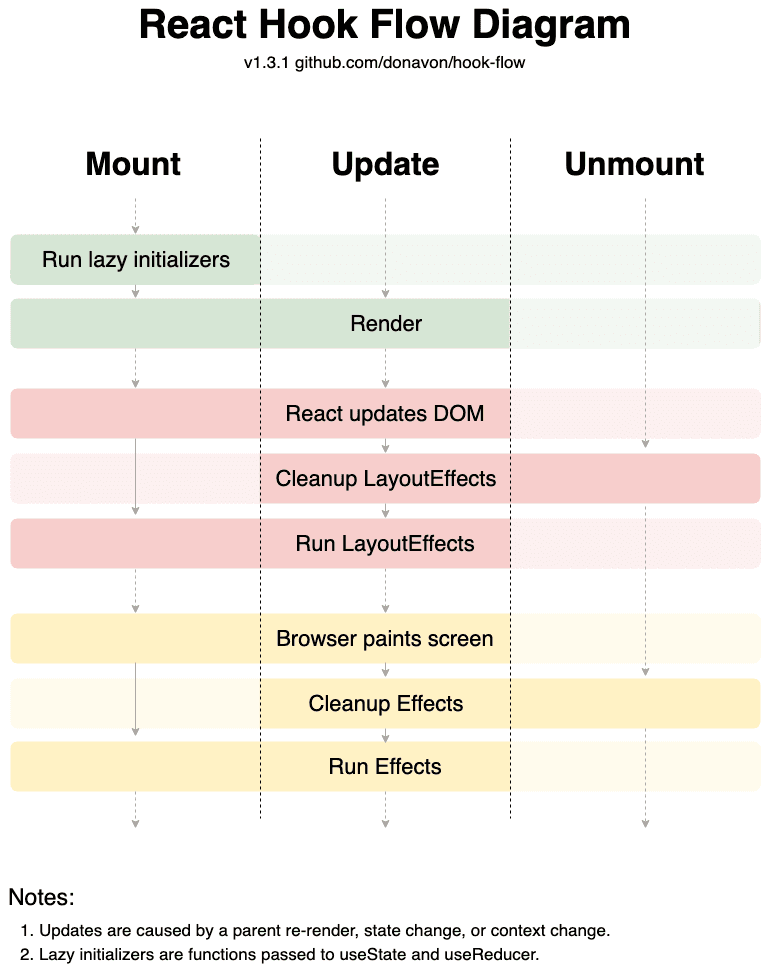
Chart: hook-flow (opens in a new tab) by Donavon West (MIT). Top to bottom, one column per phase:
| Step | Mount | Update | Unmount |
|---|---|---|---|
Lazy initializers (useState(() => …), useReducer(r, arg, init)) | run | skipped | - |
| Render (component body) | run | run | - |
| React updates the DOM | insert | patch | remove |
Layout effects (useLayoutEffect) | run | old cleanup, then new run (deps changed) | cleanup |
| Browser paints | yes | yes | yes |
Effects (useEffect) | run | old cleanup, then new run (deps changed) | cleanup |
Performance hooks
With the React Compiler on, skip manual
useMemo/useCallback in new code; keep them where an effect depends on identity or a
third-party library compares references.
| Hook | Caches or schedules | Notes |
|---|---|---|
useMemo(() => v, deps) | a value | the function must be pure; React may drop the cache |
useCallback(fn, deps) | a function | same as useMemo(() => fn, deps) |
useTransition() | updates inside start as low priority | start accepts async functions (actions) |
useDeferredValue(v, init?) | a copy of v that trails urgent renders | init is shown on the first render (19) |
import {
  memo,
  useDeferredValue,
  useState,
  useTransition,
} from "react";

declare function search(q: string): string[]; // slow
declare function save(text: string): Promise<void>;

const Results = memo(function Results(p: { q: string }) {
  const rows = search(p.q);
  return <ul>{rows.map((r) => <li key={r}>{r}</li>)}</ul>;
});

function Search() {
  const [q, setQ] = useState("");
  const deferred = useDeferredValue(q); // lags while typing
  const stale = q !== deferred;
  return (
    <>
      <input
        value={q}
        onChange={(e) => setQ(e.target.value)}
      />
      <div style={{ opacity: stale ? 0.5 : 1 }}>
        <Results q={deferred} />
      </div>
    </>
  );
}

function SaveButton({ text }: { text: string }) {
  const [isPending, startTransition] = useTransition();
  return (
    <button
      disabled={isPending}
      onClick={() => startTransition(() => save(text))}
    >
      {isPending ? "Saving..." : "Save"}
    </button>
  );
}
useDeferredValue only helps if the slow child is memoized (memo or the compiler); otherwise
the parent re-render redoes the work anyway.
useId, useSyncExternalStore & useDebugValue
import {
  useDebugValue,
  useId,
  useSyncExternalStore,
} from "react";

function Field({ label }: { label: string }) {
  const id = useId(); // stable, matches server and client
  return (
    <>
      <label htmlFor={id}>{label}</label>
      <input id={id} aria-describedby={`${id}-hint`} />
      <small id={`${id}-hint`}>Required</small>
    </>
  );
}

function subscribe(onChange: () => void) {
  window.addEventListener("online", onChange);
  window.addEventListener("offline", onChange);
  return () => {
    window.removeEventListener("online", onChange);
    window.removeEventListener("offline", onChange);
  };
}

export function useOnline(): boolean {
  const online = useSyncExternalStore(
    subscribe, // stable: declared outside the component
    () => navigator.onLine, // client snapshot
    () => true, // server snapshot (SSR, hydration)
  );
  useDebugValue(online ? "Online" : "Offline");
  return online;
}
useSyncExternalStore rule | Why |
|---|---|
getSnapshot returns the same value while nothing changed | a new object each call loops forever; return primitives or cached objects |
subscribe is stable | a new function each render resubscribes every render |
Provide getServerSnapshot | required for SSR; mismatch with the client value re-renders after hydration |
Don't use useId for list keys | keys come from data |
Actions: useActionState, useOptimistic, useFormStatus
import { startTransition, useActionState } from "react";
import { useFormStatus } from "react-dom";

declare function addToCart(sku: string): Promise<number>;

function AddButton({ sku }: { sku: string }) {
  const [count, add, isPending] = useActionState(
    async (_prev: number, s: string) => addToCart(s),
    0,
  );
  return (
    <button
      disabled={isPending}
      // outside a form: dispatch inside a transition
      onClick={() => startTransition(() => add(sku))}
    >
      In cart: {count}
    </button>
  );
}

function Submit() {
  const { pending, data } = useFormStatus(); // parent form
  const email = data?.get("email");
  return (
    <button disabled={pending}>
      {pending ? `Sending ${String(email)}...` : "Send"}
    </button>
  );
}| Hook | Gotcha |
|---|---|
useActionState | dispatches queue and run one after another; each gets the previous result |
useActionState | calling dispatch outside a transition or action prop warns and isPending stays false |
useActionState | a thrown error cancels queued dispatches; return error state for expected failures |
useOptimistic | the setter only works inside a transition or action; the value reverts when it settles |
useFormStatus | reads the parent <form> only; calling it in the form's own component returns idle |
The full form example with a typed server action and useOptimistic is in
TypeScript & React: Forms & actions.
Custom hooks
| Convention | Why |
|---|---|
Name starts with use + capital letter | the linter and compiler treat it as a hook |
| It calls at least one hook | otherwise make it a plain function (no use prefix) |
| Shares logic, not state | each call gets its own state; share state via context or a store |
| Accept values, return values | useChatRoom({ roomId }) over useMount(fn)-style lifecycle wrappers |
| Callbacks from callers | wrap in useEffectEvent so they don't re-run your effects |
Return a tuple as const or an object | tuple for 2 values (renameable), object for more |
| Name by purpose | useOnlineStatus, not useEffectOnce |
Test with renderHook | from @testing-library/react; see Testing |
import { expect, test } from "bun:test";
import { renderHook } from "@testing-library/react";
import { usePrevious } from "./use-previous";

test("returns the previous distinct value", () => {
  const { result, rerender } = renderHook(
    ({ v }) => usePrevious(v),
    { initialProps: { v: 1 } },
  );
  expect(result.current).toBeUndefined();
  rerender({ v: 2 });
  expect(result.current).toBe(1);
  rerender({ v: 2 }); // same value: unchanged
  expect(result.current).toBe(1);
});
eslint-plugin-react-hooks
v7 ships the classic hooks rules plus the React Compiler's diagnostics in one recommended
preset. Use it even without the compiler.
bun add -d eslint eslint-plugin-react-hooksimport reactHooks from "eslint-plugin-react-hooks";
import { defineConfig } from "eslint/config";
export default defineConfig([
reactHooks.configs.flat.recommended,
{
rules: {
"react-hooks/exhaustive-deps": [
"warn",
{ additionalHooks: "(useIsomorphicLayoutEffect)" },
],
},
},
]);| Rule | Catches |
|---|---|
rules-of-hooks | conditional or nested hook calls, hooks in non-hook functions |
exhaustive-deps | missing or needless deps in effects, useMemo, useCallback |
set-state-in-effect | synchronous setState in an effect body |
set-state-in-render | unconditional setState during render (infinite loop) |
refs | reading or writing ref.current during render |
purity | impure calls in render (Date.now(), Math.random()) |
immutability | mutating props, state or hook return values |
static-components | components defined inside other components |
preserve-manual-memoization | manual memo the compiler can't keep |
incompatible-library | libraries known not to work with memoization |
recommended-latest adds experimental rules. On ESLint 8 legacy config, extend
plugin:react-hooks/recommended. Next.js's eslint-config-next already includes the plugin.
Recipes
useDebounce
Delay a fast-changing value (search input) until it stops changing for ms.
import { useEffect, useState } from "react";

export function useDebounce<T>(value: T, ms = 300): T {
  const [debounced, setDebounced] = useState(value);
  useEffect(() => {
    const id = setTimeout(() => setDebounced(value), ms);
    return () => clearTimeout(id);
  }, [value, ms]);
  return debounced;
}

// const q = useDebounce(input, 250);
useLocalStorage
Persisted state that stays in sync across components and tabs; validate with Zod if the stored shape can change.
import { useCallback, useSyncExternalStore } from "react";
const EVT = "local-storage"; // same-tab updates
function subscribe(cb: () => void) {
  const ac = new AbortController();
  const opts = { signal: ac.signal };
  addEventListener("storage", cb, opts); // other tabs
  addEventListener(EVT, cb, opts);
  return () => ac.abort();
}
export function useLocalStorage<T>(key: string, init: T) {
  const raw = useSyncExternalStore(
    subscribe,
    () => localStorage.getItem(key),
    () => null, // server snapshot
  );
  let value = init;
  try {
    if (raw !== null) value = JSON.parse(raw) as T;
  } catch {} // corrupt entry: fall back
  const set = useCallback((next: T) => {
    localStorage.setItem(key, JSON.stringify(next));
    dispatchEvent(new Event(EVT));
  }, [key]);
  return [value, set] as const;
}
useMediaQuery
React to a CSS media query (prefers-reduced-motion, breakpoints) without a resize listener.
import { useCallback, useSyncExternalStore } from "react";

export function useMediaQuery(query: string, ssr = false) {
  const subscribe = useCallback(
    (cb: () => void) => {
      const mql = matchMedia(query);
      mql.addEventListener("change", cb);
      return () => mql.removeEventListener("change", cb);
    },
    [query],
  );
  return useSyncExternalStore(
    subscribe,
    () => matchMedia(query).matches,
    () => ssr, // server guess
  );
}

// const reduce = useMediaQuery("(prefers-reduced-motion)");
useInterval
A declarative setInterval whose callback always sees fresh state; pass null to pause.
import { useEffect, useEffectEvent } from "react";

export function useInterval(
  callback: () => void,
  ms: number | null,
): void {
  const tick = useEffectEvent(callback);
  useEffect(() => {
    if (ms === null) return; // paused
    const id = setInterval(() => tick(), ms);
    return () => clearInterval(id);
  }, [ms]);
}

// useInterval(() => setSecs(secs + 1),
//   running ? 1000 : null);
usePrevious
The previous distinct value of a prop or state, for "changed from X to Y" logic.
import { useState } from "react";

export function usePrevious<T>(value: T): T | undefined {
  const [current, setCurrent] = useState(value);
  const [previous, setPrevious] = useState<T>();
  if (!Object.is(current, value)) {
    // adjusting state during render: React re-renders
    // immediately, before children, with no extra paint
    setPrevious(current);
    setCurrent(value);
  }
  return previous;
}
useOnClickOutside
Close a popover or menu when the user presses anywhere outside it.
import { useEffect, useEffectEvent } from "react";
import type { RefObject } from "react";

export function useOnClickOutside(
  ref: RefObject<HTMLElement | null>,
  handler: (e: PointerEvent) => void,
): void {
  const onOutside = useEffectEvent(handler);
  useEffect(() => {
    const listener = (e: PointerEvent) => {
      const el = ref.current;
      // composedPath also works across shadow DOM
      if (el && !e.composedPath().includes(el)) {
        onOutside(e);
      }
    };
    document.addEventListener("pointerdown", listener);
    return () =>
      document.removeEventListener("pointerdown", listener);
  }, [ref]);
}
useFetch
Small client-side fetch that aborts on change or unmount, validates the result and derives
loading instead of setting it; use a query library once you need caching or retries.
import { useEffect, useEffectEvent, useState } from "react";
type State<T> = { status: "loading" }
  | { status: "ok"; data: T }
  | { status: "error"; error: unknown };
export function useFetch<T>(
  url: string, parse: (json: unknown) => T, // Schema.parse
): State<T> {
  const [res, setRes] = useState<[string, State<T>]>();
  const toData = useEffectEvent(parse);
  useEffect(() => {
    const ctrl = new AbortController();
    const settle = (s: State<T>) => {
      if (!ctrl.signal.aborted) setRes([url, s]);
    };
    fetch(url, { signal: ctrl.signal })
      .then(async (r) => {
        if (!r.ok) throw new Error(`HTTP ${r.status}`);
        const data = toData(await r.json());
        settle({ status: "ok", data });
      })
      .catch((error) => settle({ status: "error", error }));
    return () => ctrl.abort();
  }, [url]);
  return res?.[0] === url ? res[1] : { status: "loading" };
}
useEventListener
Typed window listener whose handler can change freely without re-subscribing.
import { useEffect, useEffectEvent } from "react";

export function useEventListener<
  K extends keyof WindowEventMap,
>(
  type: K,
  handler: (e: WindowEventMap[K]) => void,
  { capture, passive }: AddEventListenerOptions = {},
): void {
  const onEvent = useEffectEvent(handler);
  useEffect(() => {
    const opts = { capture, passive };
    const listener = (e: WindowEventMap[K]) => onEvent(e);
    addEventListener(type, listener, opts);
    return () => removeEventListener(type, listener, opts);
  }, [type, capture, passive]);
}

// useEventListener("keydown", (e) => e.key === "Escape"
//   && close());
References
- react.dev: Built-in React Hooks (opens in a new tab)
- react.dev: Rules of Hooks (opens in a new tab)
- react.dev: Synchronizing with Effects (opens in a new tab), Removing Effect dependencies (opens in a new tab)
- react.dev: Separating events from Effects (opens in a new tab),
useEffectEvent(opens in a new tab) - react.dev: Reusing logic with custom Hooks (opens in a new tab)
- react.dev:
useSyncExternalStore(opens in a new tab),useActionState(opens in a new tab),useOptimistic(opens in a new tab) - react.dev: eslint-plugin-react-hooks (opens in a new tab)
- MDN:
Window.matchMedia()(opens in a new tab),storageevent (opens in a new tab),AbortController(opens in a new tab) - Testing Library:
renderHook(opens in a new tab) - usehooks-ts (opens in a new tab): more ready-made hooks to compare against
- donavon/hook-flow (opens in a new tab): the hook lifecycle chart above (MIT)